
Buyer's Guide
How to Compare Copiers for Your Business
An office staple for the last half century, the copier has come a long way since Xerox introduced the first fully automated plain-paper photocopier in 1959. Compare copiers from that era to today's modern machines and the differences are amazing: current models have more in common with computers than they do with that first Xerox 914, combining copying, laser printing, faxing, scanning, and more into one networked machine.
With $24 billion in revenue on the line and over 1.5 million new copiers sold each year manufacturers are driven to constantly improve their offerings; meanwhile vendors who offer installation and service operate in a highly competitive market. This means you, the customer, need to know exactly what you are looking for when shopping for a business copier.
This BuyerZone Copiers Buyer's Guide will help you learn everything you need to know about buying a business copier -- from deciding what you need, to choosing a seller, to interpreting copier reviews, to knowing how much you should pay. We can also put you in touch with several highly qualified office copier vendors so you can get competitive price quotes.
For most businesses, a copier represents a substantial investment. Whether you’re interested in buying or leasing, the first step in the selection process is to have a firm grasp on your business needs. These can be determined by answering the three simple questions you’ll find below.
Choosing Office Copiers
Years ago, customers had the choice between the simplicity and tradition of analog copiers and the modernity and functionality of digital copiers. Analog machines, however, stopped being manufactured in 1996. As with many products we use, copiers have become exclusively digital.
Before you start comparing digital office copiers, there are three key questions you'll need to answer:
1. What do I need my office copier to do?
Modern office copiers are often referred to as multifunctional products (MFPs) or multifunctional devices because they do much more than just copy. MFPs also print, fax, scan, email, make double sided copies, collate, punch holes, staple, and make booklets.
Having a multifunctional product connected to your internal network allows you to take care of many tasks directly from your computer. Not only can MFPs aid in electronic communication, they make it convenient to create finished documents without ever leaving your desk. They're also the ideal space saver, considering that one device handles your scanning, faxing, emailing, and printing. To help determine which multifunctional features will benefit you, see the Basic Features section below.
Additionally, you will need to carefully consider your color printing needs. The Color Copiers section of this guide provides more details.
2. How much do I need to print and copy?
Once you decide on the features you need, the next step is to narrow your choices based on the number of copies you make in a month.
If you already own or rent a copier, you can determine your actual copier usage by looking at the counter, usually found under the platen glass or internal storage. Much like an odometer on a car, the meter on the copier cannot be tampered with. It varies from copier to copier, but each one has a menu that shows how many color copies, color prints, black and white copies, black and white prints have been made. The overall total is also displayed on the counter.
If you don't have a copier at all, use your copy shop receipts to get a sense for your volume. If you're going to use the copier as a network printer as well, a useful way to get a rough estimate is to track your monthly paper consumption.
Don't worry about being too exact. Once you have a rough volume figure, increase it by at least 15%. This will help you account for future growth, as well as compensate for the somewhat inflated monthly copy volumes claims from manufacturers.
As you can see in the chart, 81% of BuyerZone users expect to make fewer than 10,000 copies per month. For most commercial-grade copiers, that's not a very demanding amount. If you're expecting to make fewer than 1,000 copies per month, you probably don't need the expense of a "business" copier at all. You'd be better off purchasing a small office copier, also known as a personal copy machine, from an office superstore - unless you want the advanced features or service guarantees that come with business copiers.
3. How fast do I need it to be?
Copier speed is measured in copies per minute (cpm), pages per minute (ppm), or outputs per minute (opm). Whichever term is used, it refers to the number of letter-sized pages the machine can produce in one minute when running at full speed. The copier industry categorizes six segments, defined by speed:
| Segment | Speed | Applicable Use |
| 1 | 15 ppm | very small or home office |
| 2 | 20 ppm | small offices |
| 3 | 30 - 50 ppm | small to mid-sized offices |
| 4 | 50 - 70 ppm | mid to large offices |
| 5 | 70 - 90 ppm | very large offices and/or print runs |
| 6 | 90 - 100 ppm | commercial printers |
Note that segments 3 and above can all be networked. Most companies are satisfied with copiers from segments 2 to 4, in the 20 to 70 ppm range, and our stats back this up: 70% of our users are looking for copiers that meet those specs.
Of course, more complex forms of copying--two-sided copies, copying on larger paper, and sorting--are slower. If you will be frequently doing these types of copying, make sure you anticipate and plan for the slower speed. Also, if you expect to make many one-time single copies, ask about the first-copy speed, or the number of seconds it takes for one single copy to be made.
Now that you know what you need the copier to do, you can begin comparing products by the features they include. As a general rule, the more expensive the machine, the more built-in functionalities it will include. But this isn't always the case. There are some great deals to be found in mid-range copiers. Here's what to look for.
Traditional Office Copier Features
The following features have been fairly standard on business office copiers for some time.
Feeders
An office copier with an automatic document feeder (ADF) allows you to copy multi-page documents without having to lift and lower the cover for every sheet you copy. Instead, you drop a stack of originals (up to 100 pages) into the feeder, press start, and the ADF automatically pulls each page through.
If you copy lots of double sided originals, you should invest in a recirculating automatic document feeder (RADF), which can flip pages inside the machine for simplified double-sided copying. A newer feature, Dual Imaging Document Feeders (DIDF), can scan both sides at once. DIDFs rarely, if ever, jam.
Sorting and finishing
Digital copiers can sort copied sets electronically without the use of sorter bins. Instead, copies are placed in a single tray at a right angle or offset from each other, allowing you to easily identify where one set ends and another begins. Bin-free sorting allows you to make unlimited sets all at once, rather than limiting you to sets with dedicated sorter bins.
You may want a finisher if you are frequently going to copy many sets of multi-page documents. The most familiar type of finisher is the automatic stapler, which can be a huge time-saver. More advanced versions include three-hole punches, saddle stitch binding, folding, and more. Finishers are optional on many machines, and usually carry an additional cost.
Paper supply
Each paper tray, cassette, pedestal, or paper feed unit is a separate paper source. The number of sources is important if you want to be able to copy onto different paper stocks, such as letterhead, legal size stock, or transparencies, without reloading the machine. Paper sources typically hold a minimum of 50 to 100 sheets, and the largest-capacity units can hold up to 3,000 sheets, equivalent to 5 to 6 reams of paper.
Typically, office copiers include at least one fixed-size and a couple of adjustable-size paper trays. Sometimes, heavy paper stock can jam if it's loaded into a standard paper tray. To get around this problem, most copiers include a bypass tray, a special tray that provides a straight paper path for heavy paper and labels.
While basic features may be suitable for some, many businesses now produce regular newsletters, menus, or other publications and rely on a copier to cost-effectively print a high volume of professional-looking mailings. For these applications, there are a number of advanced features to consider that even enable you to combine the work of multiple machines into a single device. Don’t invest in new office equipment before reviewing this section.
Advanced Copier Features
More advanced capabilities that used to be expensive or simply not available are now standard on today's digital multifunction devices. Many of these features can be added later– if you choose the right machine. That's because some copiers can be upgraded with a "plug and play" type of upgrade, while others require more extensive hardware fixes. If you are considering adding printing or faxing modules later, ask about the specifics of the upgrade process.
Printing
A digital copier can double as an office laser printer, working at the same speed it makes copies. Simply buy a wireless network card, configure it like another printer, and plug it into your network using an RJ45 jack. This will allow your employees to produce dozens of stapled copies of a five-page, two-sided proposal – without leaving their desks. That can mean significant savings considering that copier per-page costs can be as little as 20% of laser printer printing costs.
Most copiers run standard networking protocols, but you still need to make sure the model you choose is compatible with your network. Involving your IT department in this aspect of the copier purchase decision up front can save you significant headaches later.
Scanning
Multifunction printers scan every document being copied into memory before printing the copies, so it's natural that they can be used for creating electronic versions of your paper documents. A document feeder can be used as a sheet-fed scanner, rapidly scanning multiple pages, while books and other thicker objects can be scanned directly on the glass.
Add-ons to scanning functionality include OCR (optical character recognition) software that turns your papers into editable electronic documents, and the ability to scan directly to e-mail or a computer desktop. As mentioned previously, dual imaging document feeders (DIDF) have the capability to scan both sides at once.
Faxing
With the addition of a fax module, you can send and receive faxes through the copier. You can easily send multi-page faxes using the document feeder, or you can use the copier glass to fax single pages or parts of books or catalogs. Incoming faxes are printed as they're received, sometimes into a separate output tray. With a network interface, users can even send faxes from their computers.
Most MFPs have had email capability since 2008. The majority have a limited number of email addresses they can store; the actual amount varies from copier to copier. It's simple to pull up the email screen and select one or more of the stored addresses and then push the start button. The document on the glass or in the feeder will then get sent to those mailboxes. Email is becoming more common than faxing, although some businesses still rely on fax.
Image editing
Digital copiers can edit your documents while duplication is happening. This can include automatic page numbering, adding watermarks such as "confidential" or "copy," or adding date stamps. They can rotate scanned images to match the orientation of the available paper supply, saving on wasted time and paper from unanticipated errors.
They can also combine images in creative ways, such as copying a two-sided original - say, a check - onto just one page, or reducing and combining originals to put 2, 4, or 8 pages onto one.
Stackless duplexing
Digital copiers with enough memory can support stackless duplexing by storing each side of the original page in memory, then printing both sides of the copy. This means the number of two-sided copies you make is no longer limited by the capacity of a duplex tray. You will get your duplexed copies much faster, too.
Automatic sizing
Digital copiers usually offer an automatic sizing function on their machines. This enables the copier to note the dimensions of your original document and adjust itself using preset reduction/enlargement settings, even if your copying paper is a different size than your original.
Automatic shut-off
Almost all copiers now have an automatic shut-off option - it saves energy and decreases wear on a copier by turning the machine off if it has not been used for a set period of time.
Security
Many multifunctional devices allow you to require that users enter a code before they can make copies. This provides a level of security - preventing unauthorized usage - as well as allowing you to analyze current usage patterns by department. Some machines can also hold faxes or network documents in memory until the correct code is entered, then print them. This prevents confidential documents from being left in the output tray for any passerby to view.
Wired and wireless connection options
Some digital copiers now come with a wireless LAN interface - either the 802.11b wireless LAN standard, or a Bluetooth wireless board. Wi-Fi options are becoming more popular on newer models. You might consider a Wi-Fi add-on or a separate universal device.
Some copiers also have separate parallel and universal serial bus (USB) interfaces that allow you to connect laptops or storage devices.
Environmental friendliness
Copiers can be huge consumers of electricity - and all that paper has to come from somewhere. But despite this, copiers are becoming more environmentally friendly all the time: energy efficiency is one of the prime concerns of manufacturers and consumers alike.
Newer digital copiers usually have "energy save" modes that cause the machine to power down if it hasn't been used for a certain period of time. Also look for "Energy Star" rated copiers that save money while protecting the environment through intelligent power management.
Like any computer, the output and speed of a digital copier is largely determined by its built-in memory (a.k.a. RAM). This can be a major consideration in your purchase process, especially in offices that network the copier to multiple work stations. Make sure the model you’re considering meets at least the minimum RAM requirement listed in this section.
Digital Copier Memory
Memory (RAM, the same memory used in computers) is essential for supporting digital copier features such as scan once/print many, automatic page numbering, faxing, and printing. Modern copiers should come with sufficient memory for all the functions a typical user needs. While additional memory can be added to boost productivity and enable more memory-intensive features, it's often unnecessary. One exception might be a print shop.
In some cases, a fairly small cache of memory is dedicated for each function - copying, printing, and faxing. In other configurations, a single larger cache is shared between functions. Finding out how memory is allocated will help you make an informed purchasing decision.
Copier memory
By holding a scanned image of each original page in memory, digital copiers are able to produce as many sets of documents as required without feeding the originals through again. The number of pages that can be duplicated with this "scan once/print many" feature depends on the size of the originals and the amount of detail, with more memory equaling more capacity for output. Fortunately, most copiers are equipped with adequate memory.
You may not be able to take advantage of advanced image editing features without purchasing extra memory, though. Copiers come with anywhere from 4 MB to 256 MB and higher of RAM. If you intend to use any image editing features, or frequently produce complex documents with over 20 pages, make sure you get at least 16 MB of digital copier memory.
Fax memory
Faxes come with their own hard drive, and 1 MB of fax memory holds about 60 to 80 pages, which should be enough for most offices. Unless you plan to hold many international faxes in memory to send during off-peak hours, you probably won't need to upgrade your fax memory.
Printer memory
Printer memory determines the overall efficiency and speed of the printer. As with the copier, more detailed documents will require more memory to process. In addition, memory-hungry printer languages such as PostScript can require memory for faster printing.
The standard 2 MB to 8 MB of memory many printers are equipped with is typically not enough for effective printing. Additional memory or hard drives are almost always available as an option.
Color designs have quickly become the standard for marketing collateral in almost every industry – often determining the credibility of your business in the mind of the consumer. As a result, color copiers have exploded in popularity in recent years. But many businesses have found hybrid machines, offering both color and black-and-white printing, to be the best choice. Here’s why.
Color Copier Specifics
For most businesses that need some color printing or copying, a black and white/color hybrid copier is the best choice. By switching between b&w and color modes, a hybrid copier can save you money on expensive color copier consumables.
Color copiers work much like a computer scanner connected to a laser printer. The copier scans the original then transfers the information via laser to a charged image drum. Color toner adheres to the charged areas of the drum before being transferred to paper. The final step, as with a laser printer, is to heat the toner on the page and fuse a permanent image.
High-end models apply all four colors in a single application. Low-end machines take four passes of the same image, rolling the paper around the drum four times to apply each color. While low-end technology is less expensive, it also makes for slower copying speeds.
Color copier editing features
Standard features on digital color copiers include border erasing, image centering, color adjustment, and color balancing. Some models offer a whole menu of additional editing functions, such as colorizing, which lets you create color documents from black and white originals. Many black and white copiers include advanced editing options as well.
Over the years, color copiers have decreased in price and increased in reliability. Some businesses that formerly outsourced their color copies are now investing in a color copier to print their own ads because it will save capital down the road.
The advanced editing techniques on these copiers can be a bit complex, but the results are impressive. If you choose to invest in an editor, or a model that includes one, take the time to compare features across models. Most of these editing features are named differently from model to model, even though their functions may be the same so be sure to ask a sales representative to demonstrate exactly how to use the features you want.
Businesses that deal in graphic design work especially can benefit from owning their own color copier with advanced editing. However, basic editing functions are often enough for most users and you can still do image manipulations using standard image editing software at your computer, then simply print the results.
Consumables
You should also factor consumables (supplies which need to be replaced periodically) into the overall purchase of your color copier. The major consumables color copiers require are:
- Paper. Paper costs will be a significant part of your overall copying costs. You should select the paper for your color prints carefully, since it will probably be more expensive than the paper you buy for regular copying. Color copier manufacturers typically recommend that you use brighter and heavier paper with a color copier.
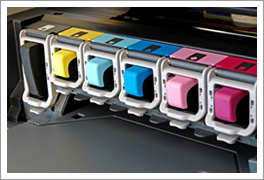
- Toner. Dealing with toner is more complex with a color copier than with a black and white copier, since four complementary toner colors are used: cyan, magenta, yellow, and black. (These are referred to as CMYK, where K stands for black.) Each toner color typically comes in a separate bottle or cartridge, so you can replace colors as they run out.
- Developer. Toner needs to be mixed with developer to be magnetically attracted to the copier drum and then fused on to paper. Most office copiers require a separate developer for each toner color. Developer usually has a yield that is twice that of the toner. TIP: When copies seem to get lighter, it is usually time to change the developer. When you run out of toner, on the other hand, you will see an overall unevenness in color.
- Fuser oil. Fuser oil is required for the last step in the (laser) copying process and does not need to be replaced often. One bottle will generally last twice as long as a bottle of developer.
Create a short-list of the copiers you’re interested in. When you're talking to sellers, they should be able to help you choose between similar machines through a standard evaluation process covered below.
Evaluating Copier Machines
Once you have decided what monthly volume, speed, color, and features you need, you can start looking at specific copier machines.
Do not assume that buying a copier machine with tons of features means that you will be paying for unnecessary options. So many features are built into digital machines these days that the "extra" features may have little to no impact on price. Just make sure you include all your requirements.
Take a test drive
When deciding between two or three different copier machines, ask the seller to bring the copiers for a demo, including hooking them up to your network if you plan to use your machine that way. If an in-house demo is not possible, make sure you visit the seller to see how the copiers work.
Whether you demo the copier machine inside or outside your office, test it with your most common tasks. For example, if you know you frequently feed 110-pound cover stock or labels through the bypass, run some through the copier and examine the output. If you want to copy your brochures onto special paper, do so and compare the output to the quality you are used to seeing.
Is color copying a priority for your business? Take samples of previously outsourced color jobs along with the stock you would like to copy onto, and evaluate how the copiers handle a typical job.
It's important to carefully review this list of digital copier prices to determine what you can expect to pay, what may be negotiable for you, and how you can get the most machine for your money.
Copier Prices and How to Buy
Prices for digital copiers have come down remarkably in recent years. However there is a very large variance in pricing, even among similar or identical models. For specific examples, see what other BuyerZone users paid for their copiers.
A word of caution: most vendors are honest, but some vendors overcharge simply because they can get away with it, while others price their base machines far below market value - even below cost - to lure you in then charge considerably more for service contracts and add-on features. Before signing a contract, make sure you understand all current and future costs. And make sure you know exactly what office copier features you need.
Business copier prices start at just under $1,500 on the lowest end for a machine capable of up to 20 ppm and a total monthly volume around 10,000 copies.
Faster models that can handle more monthly volume - workgroup or mid-volume copiers running at 21 to 35 ppm - cost between from $3,000 to $10,000. Fully loaded, a black and white copier ranges from $10,000 to $13,000 and a color copier of 30-35 ppm costs about $20,000. A refurbished color copier, however, can be found for as low as $5,000.
The high end of the business copier segment - high volume machines, boasting 36 - 56 ppm or more - costs $39,000 to $60,000.
Top-of-the-line copiers cost more than $80,000, but the performance they offer - 100+ ppm and volumes of 600,000 to 800,000 outputs per month - is usually only needed by print shops and central copy offices for large organizations.
Copier prices are affected by a number of factors. One is the add-ons you choose. Color has the most significant impact on price: expect to pay 20% to 30% more on color copiers than black and white copiers with similar speed and volume ratings. Network printing is now standard on all new models, as are automatic document feeders.
For materials, black and white copies range from .05 to .08 cents per page. Color copies run 1.9 to 3.0 cents per page. With service contracts (including toner and drum coverage), black and white copies cost .09 to 2 cents per page and color copies run 4 to 9 cents per page.
Of course, you can buy an ink-jet color printer with scanning capabilities that will essentially function as a color copier for as little as $130. However the speed and reliability of these "all-in-ones" are not adequate for most business use, and the high cost of consumables - specifically ink - will drive your per-copy cost through the roof. If you very rarely need a color copy, you may want to purchase an all-in-one inkjet copier to complement a black and white digital copier.
Negotiating
Few copiers are sold at list price. Like buying a car, there is room to negotiate. These prices are often flexible: they vary based on the options and accessories you are considering, and if you are going to purchase an extended service contract, the seller may have more room to give on the price of the copier itself. However, service contracts are less necessary than in the past due to higher reliability of copiers: the idea of paying for "insurance" on your copy machine is phasing out.
You may get even greater discounts depending on the competitive situation or if you are buying an older, refurbished, or discontinued model.
And remember, just like when buying a car: never discuss a trade-in until the end of your negotiation period. A high trade-in offer can easily blind you to an inferior deal.
Many small to mid-size businesses can incorporate the latest technology into their business by leasing. This option provides more manageable payments but may also cost you more through contractual minimums. Don't overlook this quick rundown on digital copier leases.
Buy vs. Lease
Most businesses lease or rent their copiers. The primary reason that businesses lease is to avoid the significant capital outlay required to purchase one outright. In addition, because the technology changes quickly, some leases include provisions to trade up to a newer model, allowing you to upgrade without buying anew.
As with most products, however, leasing is more expensive in the long run. Many leases charge on a per-copy basis and may include monthly copying minimums. Be careful - complex language around minimums can disguise higher costs in the future. Other leases allow you to walk away from a machine, increasing your financial flexibility if you cannot afford ongoing monthly payments. The main advantage of leasing is manageable payments if your business can't afford to pay the cash up front for purchase. If your fledgling business has a tight budget, then leasing may be a good option.
It's important to know that a digital copier seller is like any other professional: they often specialize in certain sizes of business and sometimes even specific industries. Find the best seller by following the checklist included below.
Choosing a Copier Seller
When it comes time to choose a seller, "service" is the most important word you need to remember. A great copier with bad service can cause more headaches than a so-so copier with excellent service. Since you will need to be comfortable with your copier vendor for years and years, it is in your best interest to be particular when evaluating them.
Ask questions
Get to know the sellers that carry the copier you're interested in well. Ask as many questions as you can:
- How long have you been in business? Who are your major accounts?
- How long have your employees been working for you?
- Do you sell multiple brands? Which is the strongest seller and how long have you been selling it? (If it is not the machine you're interested in, look elsewhere.)
- What is the policy on breakdowns? Is there a time limit for repair responses?
- How many in-house technicians are available for this model in the local area? Where are they? (A cheap service plan won't save you anything if the help is hard to come by. The last thing you want to discover is that there is only one technician in the city for the model a salesperson convinced you to buy.)
Talk to the techs
Because modern copiers combine electrical, mechanical, digital, and chemical systems to produce your documents, maintaining them requires a unique mix of skills. Before deciding to buy, make sure the seller has technicians with extensive installation and service experience. Having your IT or MIS department vet the seller can be a good call to test for experience.
You do not have to take the seller's word about the technicians' experience. Try to speak with the technicians directly. You can quickly judge how seasoned a technician is by having him or her recount stories of copier breakdowns or how users can prevent them from happening.
Take a tour
One of the best ways to get to know a vendor is to take a tour of their facility. You will be able to meet staff in different departments, get a sense of their size and professionalism, and take a look at their repair facilities. This can also help you make sure a potential vendor is large enough to meet your needs - but small enough to value you as a customer.
Check references
Any seller worth buying from should be more than willing to give you references. And make sure you follow through with this; as with any product or service that you purchase, neglecting to check references can be a grave mistake. Of course the seller will put you in touch with their best customers, but you can still learn from the conversations.
The references you call should own the exact model of copier you are considering. Ask them how responsive the seller has been to service calls and how comfortable they feel about the technicians' competence and level of expertise. If the copier has been problematic, find out how these problems were resolved. Read on to see how copier reviews can help the buying process.
Superstores
Copiers at the lowest end of the spectrum are available at retail or online stores, but we do not recommend purchasing this way. Preventative maintenance and ongoing service and support are critical to your copier's performance, and retail outlets do not offer appropriate service contracts. To handle breakdowns, manufacturers offer warranties that cover repairs or replacement, but most businesses want the comfort of knowing that an experienced technician is available to address any problems they have.
One of the most important steps in purchasing a digital copier isthe service agreement. This has the potential to save you money or cost you big. So when evaluating copier service agreements, it’s critical to keep in mind the total cost of ownership and understand every word in the contract you’re signing. Here’s how.
Copier Service Agreements
As copiers become more durable and reliable, service agreements are becoming less necessary; however, some customers still appreciate the security service agreements offer.
Unlike warranties, which expire after a finite amount of time, a service agreement is ongoing. The service agreement stipulates when and how repairs will be done and covers labor as well as components. As with pricing for the copier itself, service agreement pricing can vary significantly from vendor to vendor, so make sure you are able to compare by getting quotes for the same level of service from multiple vendors.
Copy volume assumptions
Service contract pricing is based on estimated copy volume. However, your copier usage is likely to fluctuate month to month due to regular business cycles or summer vacations. Be wary of contracts that stipulate an annual or monthly copy volume that is unrealistically large. While it may be tempting to overestimate your expected copy volume to get a lower per-copy rate, if you do not meet that maximum, you will not be reimbursed for the difference. Similarly, if the volume estimate is too low, sellers often charge a per-copy fee above and beyond that limit, which can end up being quite costly.
If copy volume is something you are still trying to assess, try to get a service plan that charges you only for the copies you make (pay as you go) or one based on your estimated annual, not monthly, number of copies. A fair seller should agree to those terms.
You can also negotiate a contract with monthly payments that cover copier parts and service but not supplies, or a lower monthly payment and a higher per-copy fee.
Typical coverage
All plans tend to cover costs of parts and labor for repairing and maintaining your copier. Unfortunately, "parts" often has a different definition from vendor to vendor. Parts that break during use are almost always covered, as are parts that wear out over time. This includes fuser rollers, cleaning blades, and other parts often bundled in preventative maintenance kits. Make sure you get a comprehensive list of what is and is not covered so you can compare plans accurately. You can purchase coverage that includes consumables such as toner and drums as well.
Emergency repairs
Find out whether these costs are covered in full or priced on an as-needed basis. If you will be paying as you go, you should know what your costs will be beforehand. Be sure to get a written commitment on response time (the typical maximum is four hours) and the hours service is available, particularly if you expect the copier to see a lot of use during evenings and weekends.
Also ask about loaner service. Many vendors will provide you with a replacement copier of equal or greater specifications if yours requires significant repairs.

Future costs
Get a sense for how service contracts will be priced in the future. Costs should ideally be limited to increases of less than 8% a year.
Consumables
Consumables such as toner are usually excluded from service contracts, unless you opt for an all-inclusive contract that covers all service calls, maintenance, and consumables - everything except paper and staples. All-inclusive contracts can be easier on the accounting, but may cost you more in the long run. Buyers often do not realize that they don't have to buy consumables from the seller who sold them the machine. Sometimes, in fact, you can save 15% to 20% on supplies by going through an alternate source.
Letting a seller know you are considering alternate sources for service or supplies can be a good way to dramatically reduce the price of these higher-margin items. Some copier sellers may falsely claim that you must purchase your consumables through them. This is illegal, so stand your ground.
We’ve compiled a few additional tips taken from the experiences of our customers and the expertise of our top sellers throughout the nation. Keep the following points in mind and the process of comparing digital copies will be that much simpler.
Office Copier Buying Tips
- Don’t overlook used copiers. You can save money by buying a refurbished copier. New machines depreciate quickly, and most used copiers sport the same features for a fraction of the cost. Even a two year old copier can cost about 20% of the same brand-new model.
- Buy instead of lease. Saving up the cash to purchase a quality used machine is money well spent as opposed to leasing a copier. Consider your copier purchase an investment that will pay off within a few short years.
- Take time to weigh the pros and cons of a service contract. Today’s copiers continue to increase in quality and reliability, decreasing the necessity of a service contract. Often the money spent serves only as a security blanket. You may be money ahead to find local technician whom you can call if a problem arises.
- Buy from a reputable company. Look carefully at the products and service the company has to offer and don’t hesitate to ask questions. Make sure they provide a 100%, 30 day warranty, as most problems may occur within 2 weeks of shipping. Some companies offer more comprehensive coverage with a 5 year, major components warranty.
- Buy a copier that suits your present and future needs. If your business is trying to keep costs down, it can be tempting to underestimate your copy requirements and buy a more basic machine. Figure out the number of copies you make per month then double that number of pages. It’s important to purchase a durable copier that will grow with your business.
Do you still have questions? It’s a big decision, and we’re here to help! Feel free to call one of our business specialists who will be happy to assist you if you’re unsure which of the above mentioned machines may be right for you.